How AI-Powered Summaries
Boost Your Email List
Boost Your Email List
Not a generic recap. A summary of the post the reader is already on, built around your links, your offers and your next step. The reader saves 20 minutes. You get the lead, tagged by post.
The widget as it appears on a real post. Try it yourself
AI answers in search now handle the easy questions before anyone clicks. The people who still reach your post came for something an answer box couldn't give them. They are more valuable than a visitor was two years ago, and they have less time than ever. A 20 minute read, a coffee break, and no reason to stay.
A generic summarizer compresses the text. A business-aligned summary compresses the text and keeps the parts that make you money: the affiliate links, the product mention, the internal link to the next post, the CTA. That is the difference, and it is the whole product.
Install the widget, let AI write the summaries, approve them once. Everything after that is automatic.
One lightweight script, through Google Tag Manager or pasted once. Works on any platform. No coding.
About 10 minutesQuickSum reads the article and your goals for it, then writes a summary that keeps the key points and the business inside them: your links, affiliate tags, product mentions and the next step. You review, adjust, approve. Approved summaries are cached, so you pay for generation once per post.
Minutes per post, or in bulkThe reader enters an email, the summary is delivered, and the lead lands in your email tool with source, post and tag attached.
Automatic, every timeScroll depth, time on page or exit intent. Your design, your colours, your copy.
Branded, from your domain, with your links inside. One email per request, no sequence unless you add one.
Kit, Beehiiv, MailerLite, ActiveCampaign or 21 others. Tagged by post so your sequence can start.
Which posts capture, which summaries get opened, which links get clicked.










From exit intent to scroll behavior, the timing is already tuned. Pick the trigger per widget, or per post.

Show the form when a reader is about to leave the page.
The banner appears after the reader scrolls a set percentage.

The banner appears after a set time on the page.

Show only on specific posts or categories.
Privacy-first. Runs on your keys and your email tool, with full control over the automation.
A real post with QuickSum installed. Two minutes, and you'll have experienced both sides of the exchange.
Every AI summarizer on the market serves the reader and forgets the publisher. QuickSum works on the consumption side, at the moment a reader decides whether to stay, and makes that moment pay you.

The offer matches the content on the page. It reads as part of the post, not an interruption.

Five posts or five hundred. Summaries are generated once, cached, and reused. Set up once, let it run.

Not a generic recap. Key points plus the links, offers and next steps you want the reader to see, approved by you.

Every major blog platform and 25+ email tools, connected directly. Anything else via webhook.

Long posts that readers save for later and never finish.

Reviews and comparisons where the money is in the links.

You manage content for clients who need it to produce leads.
A digital marketing blog with 120+ posts, six months, no new traffic.
The widget went live at the start of month four. Traffic stayed flat. The list and the revenue did not.
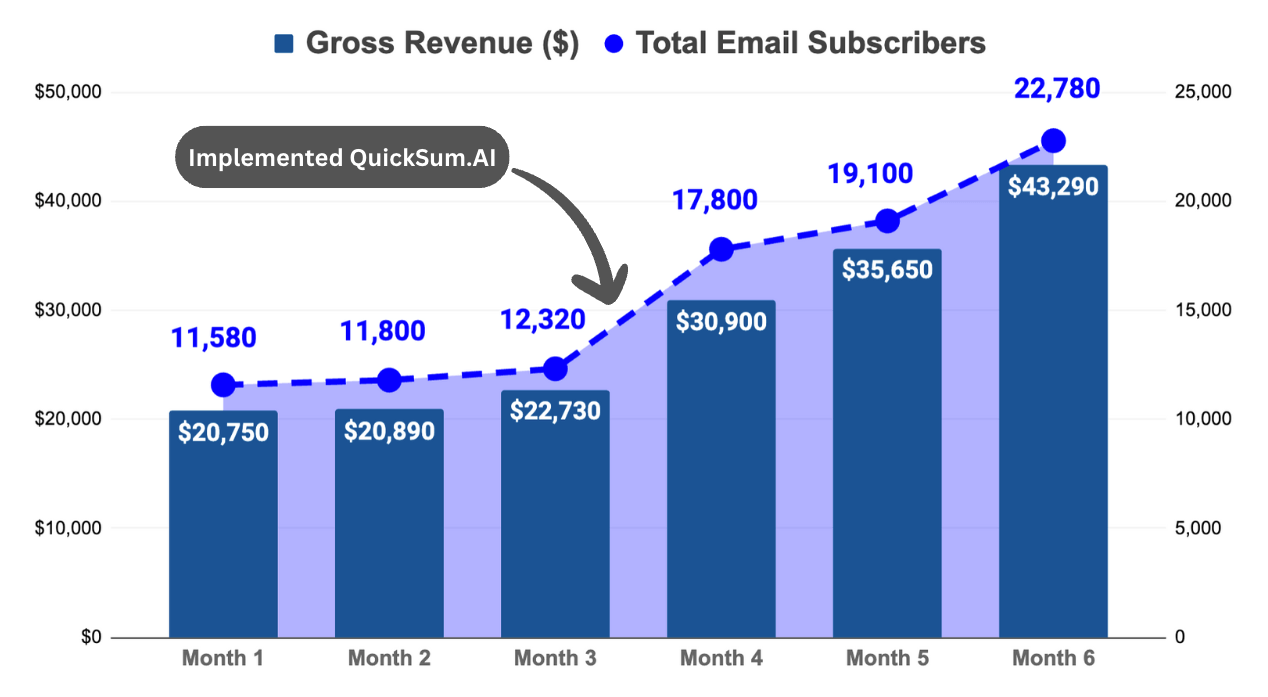
Single site. Results depend on traffic, niche and how well the summaries match the offer. Read the full case study
"QuickSum.AI helped me grow my students' email lists while boosting my own opt-ins by 9.3%. The referral program has been a bonus, letting me earn commissions as well."

"QuickSum.AI has transformed how I engage readers and capture leads. Since integrating it, I've seen over 30% conversion rates on targeted pages. This is an affiliate marketer's dream tool."

"This AI automation has tripled my email list growth in just three months. It's an essential resource for anyone looking to build a loyal audience and increase revenue."

"QuickSum.AI has helped my clients convert long-form content into actionable insights. Thanks to the tier 2 commission structure, I've also earned additional income from my clients' networks."

Open the demo post, read the summary the way a reader would, then join the waitlist. Early users get set up personally, on their own blog.
Be the first to get access and the early bird deal.A generic AI summarizer compresses the text and drops everything else. A business-aligned summary keeps the key points and the parts that earn: your affiliate links, product mentions, the internal link to the next post, your call to action. It is written around the goal you set for that post, and you approve it before any reader sees it.
One script on your site. On every post it can show a banner, a corner card or a popup, triggered by scroll depth, time on page or exit intent. The reader enters an email, receives the summary of that post by email, and lands in your email tool tagged with the post they were reading.
No. A summary is generated once per post, you review and approve it, and it is cached. Every reader after that gets the approved version instantly. You pay for generation once per post, not per visitor.
Yes. The summary keeps the links from the original post, including affiliate tags and UTM parameters, and adds a link back to the full article. Clicks inside the summary email are tracked.
WordPress, Squarespace, Webflow, Wix, Ghost and anything that lets you add a script or Google Tag Manager. If you can paste one line of code, it works.
QuickSum.AI turns the content you already have into email subscribers. It does that in three ways. On your blog, a lightweight widget offers readers an AI-generated summary of the article they are reading in exchange for their email. On YouTube, it turns a video into an interactive step-by-step guide with your links placed inside the right step. And with the Lead Magnet Builder, it turns a post, a video or a file into a hosted, gated lead magnet you can share from anywhere, with or without a website. Every subscriber lands in your own email tool, tagged by what they came from. One dashboard manages all three, with design, analytics and integrations in one place.
A summary compresses one article for a reader who has no time, and lives on that post. A video guide turns one video into steps the viewer can follow with the video paused, with your tools and links inside each step. A lead magnet expands your knowledge into a standalone asset: a playbook, checklist or workbook built from several posts, a video or a file, hosted on its own page and gated behind an email form. Summaries and guides catch the person consuming your content right now. Lead magnets catch the person who wants to go deeper, from any platform.
One dashboard for all three: summary widgets with customizable designs and behavior-based triggers (scroll depth, exit intent, time on page), video guide generation from YouTube links, the Lead Magnet Builder with hosted pages and prebuilt banners for your posts, direct integrations with 25+ email tools, automated delivery emails, real-time analytics across everything, and guided onboarding with direct founder support. Most people are live in under an hour.
For blog summaries, yes, since the widget lives on your posts. For video guides and lead magnets, no. Both are hosted by QuickSum on their own page, so a YouTube description, a Pinterest pin, a LinkedIn post or a bio link can send people straight to them. When you launch a site later, the same lead magnet plugs into your posts as an inline banner.
Most blogs and channels lose the majority of their visitors without capturing a single lead. QuickSum offers your audience something immediately useful, connected to what they are consuming right now: the summary of the article, the guide for the video, the playbook for the topic. In exchange you get the email, delivered to your email tool with source tagging, so the follow-up matches what they actually read or watched. Affiliate links inside summaries, guides and lead magnets are preserved and tracked, so the same content also earns more per click.
Form tools give you an empty container and leave you to write, design, host and deliver what goes behind it. QuickSum builds the thing being offered: the summary, the guide or the lead magnet, from your existing content, and wires the capture, the delivery email and the email-tool sync around it. The offer is specific to what the person is consuming, so it reads as part of the content, not an interruption. And there is nothing else to connect.
No. Most AI tools help you make more content. QuickSum makes the content you already made convert. Nothing here asks you to write, record or design something new. It reads what exists and builds the capture layer on top.
QuickSum.AI integrates directly via API with Mailchimp, Kit (ConvertKit v4), Beehiiv, MailerLite, Brevo (Sendinblue), Klaviyo, ActiveCampaign, HubSpot, SendGrid, Buttondown, GetResponse, Drip, AWeber, Flodesk, Pipedrive, Systeme.io, Ghost, Moosend, Campaign Monitor, Omnisend, Loops, EmailOctopus, Resend, Kajabi, Teachable and Thinkific. Any other tool can connect through the webhook integration. If your platform supports webhooks, it works with QuickSum.AI.
They receive one email with the summary, guide or lead magnet they asked for, plus any files and links you attached. At the same time they are added to your email tool with a tag for the source. There is no automated sequence unless you build one in your own email tool. From there you nurture, promote and sell the way you already do.
No coding required. Blog widgets and lead magnet banners install through Google Tag Manager or a single script and work with WordPress, Squarespace, Webflow, Wix and more. Video guides and hosted lead magnet pages need no code on your side at all. Guided setup walks you through every step, and you have direct access to founder support if you get stuck.
Your own AI provider API key (generation costs cents per item), a transactional email service such as Resend or SendGrid for delivery, and the email marketing tool you already use. Google Tag Manager is free and probably already on your site. QuickSum.AI runs on a bring-your-own-key model so you keep full control of your data and your costs stay transparent.
The widget and banner scripts are lightweight and load asynchronously, so they are designed to keep page speed impact minimal. Hosted lead magnet pages use standard paywall markup, so search engines can read gated content the right way.
Summaries work best on blogs with established traffic and long-form content. Video guides fit channels that publish tutorials, reviews or in-depth explainers. The Lead Magnet Builder works for anyone with content worth going deeper on, including creators who have an audience but no website yet. Marketing, business, technology, health, finance, hobbies, education: if your content attracts people and your list is not growing at the same pace, QuickSum can help.
QuickSum.AI sends one email per request, the one the person asked for. No follow-up sequence unless you add one in your own email tool. People opt in for something specific, so the email is expected, not an interruption.
Readers and viewers explicitly opt in by requesting a summary, guide or lead magnet, which is clear consent for email collection. Your leads live in your own email tool and your AI key stays yours. QuickSum.AI is designed with GDPR in mind and plugs into the privacy-compliant setup you already run.
That depends on your traffic, your niche and how well the offer matches the content. Blogs with steady traffic usually see opt-in rates move within the first week. Channels and creators without a site get a capture channel they did not have before. You can test on real traffic before committing, and founder support is there to help tune the setup.
Yes. 50% commission on direct sales and 30% on second-tier referrals, with a full Partner Promotion Kit: email templates, social copy and outreach playbooks. Visit the Partner Program page for the earnings calculator.
Got a specific question? Get in touch with us.
Contact